
HOW TO CREATE A TRADING ACCOUNT IN VTMARKETS
Step 1. Register and Create a live account in VTMarkets using link below:
https://bit.ly/VTMarkets
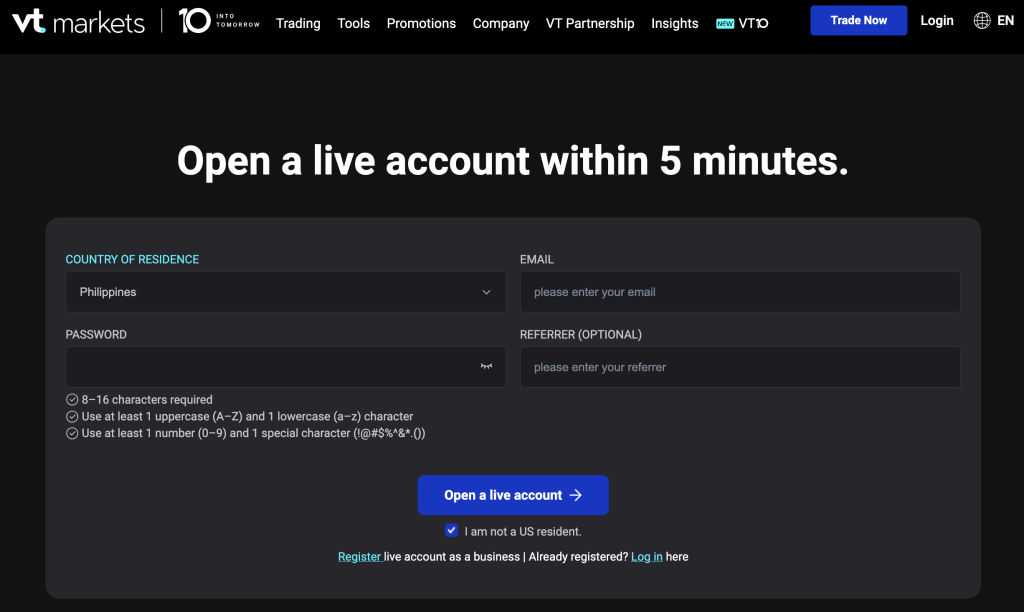
Select Country (Phils) -> Enter your Email -> Set password -> Click Open a Live Account (No need to fill-up referrer)
Create a Live Trading Account
Click: + Open Live Account > Metatrader 5 > Standard Swap-Free > $ USD > Choose 500:1 Leverage > Click Submit
Verify your account (upload your Philippine Government ID with Address to be verified)
Note: Your account needs to be fully verified to avoid problems when withdrawing your profit.
STEP 2: Create a Demo Account
In VTMarkets, go to Menu:
Click: Account -> Click, Live/Demo Accounts (to change from Live to Demo Account)
Click: + Open Demo Account > Metatrader 5 > Standard STP > $ USD > 500:1 (Leverage) > $1000 (Account Balance) > Submit
STEP 3. Download MT5 (Metatrader 5) app in playstore/ App Store

STEP 4: Login your Demo Account to Metatrader5 (MT5)
Go to your MT5 App Account > Click + > Find broker (VT Markets)> Select server: VTMarkets-DEMO > Input Login & Password (Trading Platform PW)
Note#1: If you are not able to setup your login and password in MT5, go to your VTMarkets Demo account #, click the gear button and select change password, then, Forgot password. Check your email and click the link to change your password.
Click HERE to go to VTMarkets Login
Note#2: Your password should be at least 8 characters which contain Capital and Small letters, number and special character.
Once your demo account is okey, you’re ready to have a 1:1 Coaching and get ready for onboarding!
STEP 5: Familiarize yourself on how to navigate MT5.
To familiarize and navigate Metatrader 5 (MT5), CLICK HERE.
By this time, explore and navigate MT5 until you become familiar with its features. Try setting up: Currency Pair, Timeframe, Market Execution, SL, TP, Buy Stop, Sell Stop etc.
STEP 6: Practice Trading Using Demo Account.


